Web accessibility services for small businesses and freelancers
Your website — professionally delivered, personally supported.

Would you like to make your website accessible? There are two routes: I audit and remediate your existing Elements website to WCAG 2.2 Levels A and AA, or I plan, build and test your new website in Elements to be accessible from the outset. In either case, you receive a clear report with measurements at the end, rather than a list of raw tool warnings.
I use the same process that I have documented openly on my own homepage: automated and manual testing, implementation of corrections, and a documented retest with a real form test.
Personal, friendly, reliable: ocPhone1
This service is specifically for websites built with RapidWeaver Elements or newly created in Elements. I work directly in your Elements project, with no code export and no one-off solution that you cannot maintain afterwards. The second route also includes moving from RapidWeaver Classic to Elements: the site is rebuilt in Elements, accessibility is considered from the outset and the completed site is tested.
Does your existing website run on WordPress, Wix or another system? I can still audit it to WCAG 2.2 Levels A and AA and document the results clearly. However, I do not make technical corrections in these systems. You can implement the report yourself or with your existing provider, or have me rebuild your website in RapidWeaver Elements.
Important on pricing: for a new website and a Classic migration, work to WCAG 2.2 Levels A and AA is an additional paid option. It is not automatically included in the price of a new website or migration; following the free initial assessment, it is listed separately in the fixed-price quote. It is carried out only if you expressly commission it.
Key points at a glance
Who it is for: freelancers, small businesses, clubs, associations and non-profit projects. I can audit and remediate existing Elements websites. I can audit and document websites built in other systems, or rebuild them in Elements if requested.
Two delivery routes: route 1 is the audit and remediation of an existing Elements website. Route 2 is a new website planned to WCAG 2.2 Levels A and AA from the outset, built in Elements and tested before publication; this includes moving from RapidWeaver Classic to Elements. An audit-only engagement with a report is also possible for websites built in other systems.
Requirement: for technical remediation, the website must be available as a RapidWeaver Elements project and I need access to the project and the published pages. Under route 2, the Elements project is created afresh: from scratch, as a rebuild of a website from another system, or as a move from RapidWeaver Classic. For an audit-only engagement, access to the published pages is sufficient.
Service: auditing to WCAG 2.2 Levels A and AA, both automated and manual. For Elements websites, this can be followed by technical and editorial implementation in Elements, retesting and a report. Under route 2, accessible planning is added before the build begins. For websites from other systems, an audit-only engagement ends with the report.
Outcome: always a test report with measurements and a clear statement of what has passed within the agreed test scope on the documented date, and where the limits of that scope lie. If implementation is commissioned, you also receive the remediated or newly built Elements website.
Process: free initial assessment, individual fixed-price quote, then — depending on the route — audit and remediation, or planning, build and testing, in each case with retesting and a report.
Timescale: depends on the number of pages, variety of components and scope of corrections. I state a realistic completion time clearly in the fixed-price quote, rather than giving a blanket estimate beforehand.
Price: an individual fixed-price quote after the free initial assessment. No open-ended hourly billing.
Additional option for new websites: for a new website and a Classic migration, planning, implementation, testing and documentation to WCAG 2.2 Levels A and AA are an additional paid option. They are not included in the normal price for a new website or migration, are shown separately in the fixed-price quote and are carried out only when expressly commissioned.
Where I work: remotely across the German-speaking region, based in Peine in Lower Saxony.
Language: consultation and reports in English; I can include German language versions of your websites in the audit if requested.
Why WCAG 2.2 matters internationally
Most national accessibility laws — including the European Accessibility Act (EAA) in the EU, the Equality Act 2010 in the UK, Title III of the ADA and California's Unruh Civil Rights Act in the United States, and the AODA in Ontario — do not prescribe their own technical standard for websites. In practice, courts, regulators and public-sector guidance across these jurisdictions reference the same benchmark: the Web Content Accessibility Guidelines (WCAG), Level AA, currently in version 2.2.
That is exactly what I audit and remediate against. Whether your business is based in Germany, elsewhere in the EU, in the UK or beyond, WCAG 2.2 Level AA is the technical target that satisfies the substantive accessibility expectation of your local law. Whether that law actually applies to your specific business, and whether there are additional obligations such as publishing an accessibility statement, is a legal question I do not answer. Please consult a qualified lawyer in your jurisdiction.
Two routes to an accessible website
Accessibility can be established retrospectively or planned from the outset.
In both cases, I carry out the technical implementation within RapidWeaver Elements and always with documented testing.
I can also audit websites from other systems; however, corrections there must be implemented by the operator or by a provider familiar with the relevant system.
Audit and remediate an existing Elements website
Your website is published and is to be remediated to WCAG 2.2 Levels A and AA, because you want this or because you need it. The audit is only part 1. The actual work then follows: technical and editorial implementation in your Elements project, followed by retesting and the report. So you receive not merely a list of findings, but a remediated website and evidence that the corrections work. This route is a separate paid engagement for audit and remediation.
Existing website: what I do — the detailed process
Existing website: baseline review
Automated testing tools are useful, and I use them. They reliably identify missing alternative text, invalid ARIA attributes, insufficient contrast for known colour values and structural errors. What they cannot do is judge whether alternative text actually describes the image content, whether keyboard order is logical, whether a form error reaches the right field in understandable language, or whether assistive technology reads out a status message at all.
That is why I test both. axe-core runs on your page in its loaded state and provides measurable violations. I then go through the page using a keyboard, measure contrast and spacing where the tool cannot give an answer, reduce the window to 320 CSS px and test forms with real entries, including empty ones.
This is not scaremongering or legal advice. It is simply the difference between "the tool reports nothing" and "I have checked and can demonstrate it".
Automated testing
axe-core runs on every page in the sample in its loaded state. I document violations, passed rules, non-applicable rules and unclear reports separately.
Further testing
Keyboard operation, focus visibility, contrast measurements, display at 320 CSS px, target sizes and spacing, heading structure, alternative text, forms with empty and incorrect entries, status messages, movement and media.
Implementation in Elements
This is where the actual work begins: technical and editorial implementation using the facilities Elements provides. Labels and field instructions, heading levels, colour and contrast values, focus styles, alternative text, link text, the order and structure of components. Your websites remain normal Elements projects that you can continue to maintain yourself.
Retesting
After implementation, I test the same points again, with the same tools and the same manual checks, and record which finding has demonstrably been resolved.
Report and evidence
You receive a test report with the date, test scope, method, a criteria table with measurements, individual findings, tested remedies and the result of the retest. The report expressly states what has no further confirmed A/AA findings within the audited scope and where the limits of the defined scope lie.
What is not included
To avoid misunderstandings, I state the limits openly. Additional work by agreement: editorial content that must be newly written; third-party systems such as shops, booking or newsletter services; accessibility of PDF documents; captions, transcripts and audio description for videos; external widgets, maps and embedded forms whose markup I cannot influence.
I do not undertake technical corrections in WordPress, Wix or other website systems. I can audit such websites and document them in an actionable report. For remediation, you will then need someone who knows the relevant system, or you can commission a rebuild in RapidWeaver Elements.
Not part of the service: legal advice or an assessment of which regulations apply to your organisation. Nor do I guarantee lasting conformity, because every later content or technical change can create new barriers. An audit always describes a state on a particular date within a defined scope.
Build a new accessible website in Elements
You need a new website, or your current site still runs in RapidWeaver Classic and is to move to RapidWeaver Elements.
In that case, it is much easier to consider accessibility from the outset rather than improve it later. Along this route, we plan structure, design and content to WCAG 2.2 Levels A and AA from the beginning; I build the site in Elements, test it before publication, correct the findings and test again. This is the route if you would like an accessible website built for you.
Moving from RapidWeaver Classic to Elements: when you move from RapidWeaver Classic to Elements, the site is rebuilt in Elements rather than simply copied. This rebuild is an especially good point at which to address accessibility, because structure, heading levels, colour contrasts, forms and alternative text can all be set up correctly from the outset.
Additional paid option: work to WCAG 2.2 Levels A and AA — accessible planning, implementation, testing and documentation — is an additional paid option for a new website and a Classic migration. It is not included in the normal price for a new website or migration. After the free initial assessment, I list this additional scope separately in your individual fixed-price quote and implement it only if you expressly commission it.
The same point applies on this route: I commit to planning, implementing and testing to WCAG 2.2 Levels A and AA, and I document the result within the agreed test scope on the documented date. I do not give a blanket guarantee that a website is permanently and completely conformant, because every later change can create new barriers.
New website: what I do — the detailed process
New website or Classic migration: planning
Before the first component, we clarify the page structure, navigation and content goals and, for a migration, which content from the existing RapidWeaver Classic website is to be retained, revised or replaced. Accessibility is a requirement of the concept, not work left until afterwards.
Accessible structure, design and content
Heading hierarchy, focus order, a colour palette with tested contrasts, font sizes and line lengths, form fields with visibly indicated required information, alternative text for images, descriptive link text and text alternatives for media are defined from the outset so that they can meet WCAG 2.2 Levels A and AA.
Build in Elements
I build the website in RapidWeaver Elements using the standard components. When moving from Classic, this creates a new Elements project that you can maintain yourself afterwards.
Testing before publication
Before the site goes live, I test the new site in the same way as an existing one: automatically with axe-core and manually, with documented measurements. This makes findings visible before publication rather than afterwards.
Correction, retesting and report
I correct identified points in the Elements project, test again and document the result in the same report format as for an existing website: date, test scope, method, measurements, findings, remedies, result of retesting and the limits of the agreed test scope.
This second route is the paid additional option for a new website or Classic migration. It is shown separately in the fixed-price quote and carried out only when expressly commissioned.
What is not included
To avoid misunderstandings, I state the limits openly. Additional work by agreement: editorial content that must be newly written; third-party systems such as shops, booking or newsletter services; accessibility of PDF documents; captions, transcripts and audio description for videos; external widgets, maps and embedded forms whose markup I cannot influence.
Not part of the service: legal advice or an assessment of which regulations apply to your organisation. Nor do I guarantee lasting conformity, because every later content or technical change can create new barriers. An audit always describes a state on a particular date within a defined scope.
Why automated tests alone are not enough
Automated testing tools are useful, and I use them. They reliably identify missing alternative text, invalid ARIA attributes, insufficient contrast for known colour values and structural errors. What they cannot do is judge whether alternative text actually describes the image content, whether keyboard order is logical, whether a form error reaches the right field in understandable language, or whether assistive technology reads out a status message at all.
That is why I test both. axe-core runs on your page in its loaded state and provides measurable violations. I then go through the page using a keyboard, measure contrast and spacing where the tool cannot give an answer, reduce the window to 320 CSS px and test forms with real entries, including empty ones.
This is not scaremongering or legal advice. It is simply the difference between "the tool reports nothing" and "I have checked and can demonstrate it".
A real example: my own homepage
I show the process through the most honest example I have: my own websites. The main scope was the German homepage as a single page on 14 August 2026; I also tested the English language version at `/en/welcome/` and tested submission behaviour there.
Starting point
axe-core 4.10.3 reported zero violations. The only unclear report, the contrast of the message field, could be resolved manually: dark grey text on white produces 12.63:1. Manual testing nevertheless found one confirmed Level A issue. In the contact form, the email field and privacy checkbox were technically required, but there was no visible indication anywhere that they had to be completed. This is required by success criterion 3.3.2.
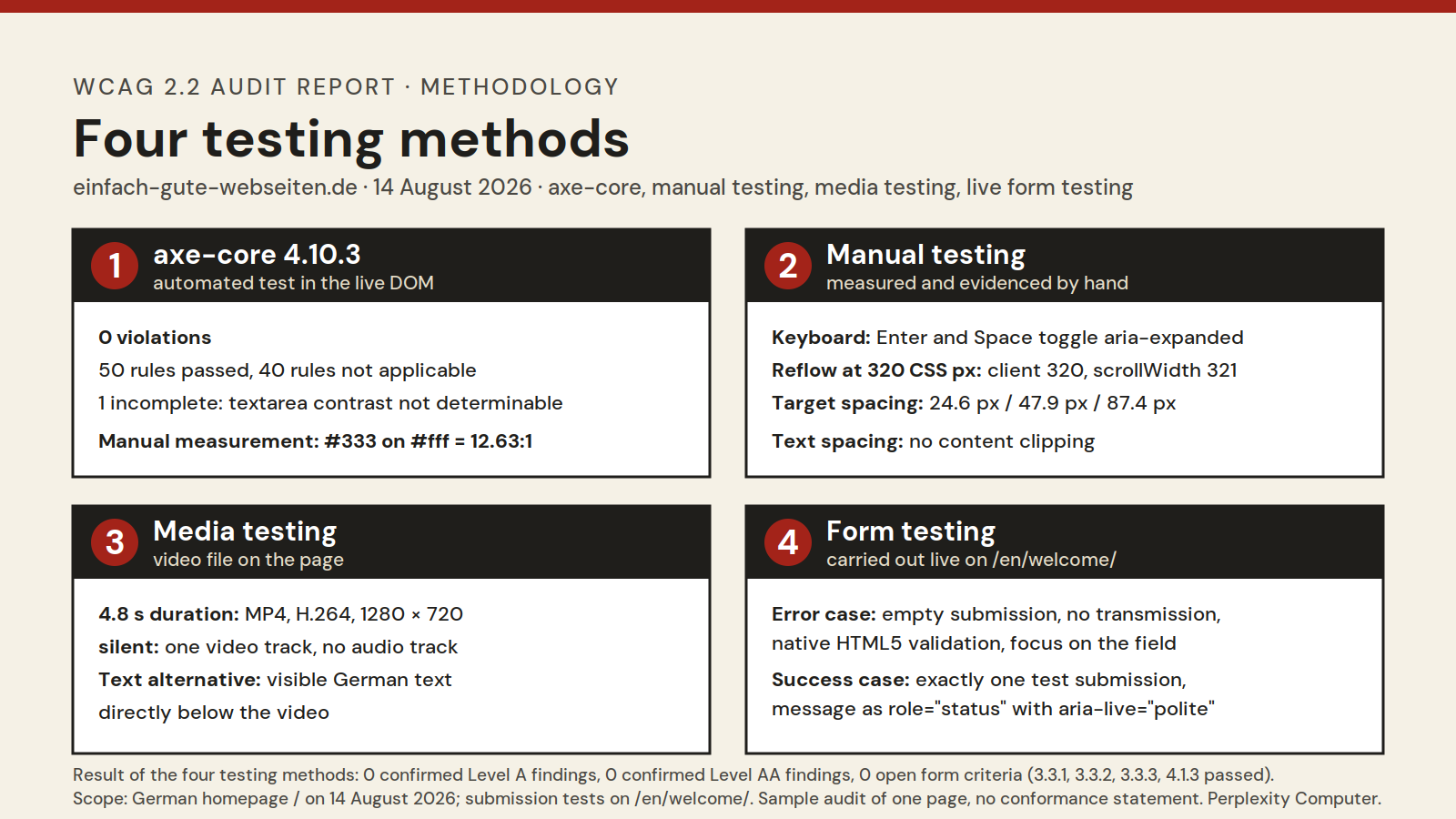
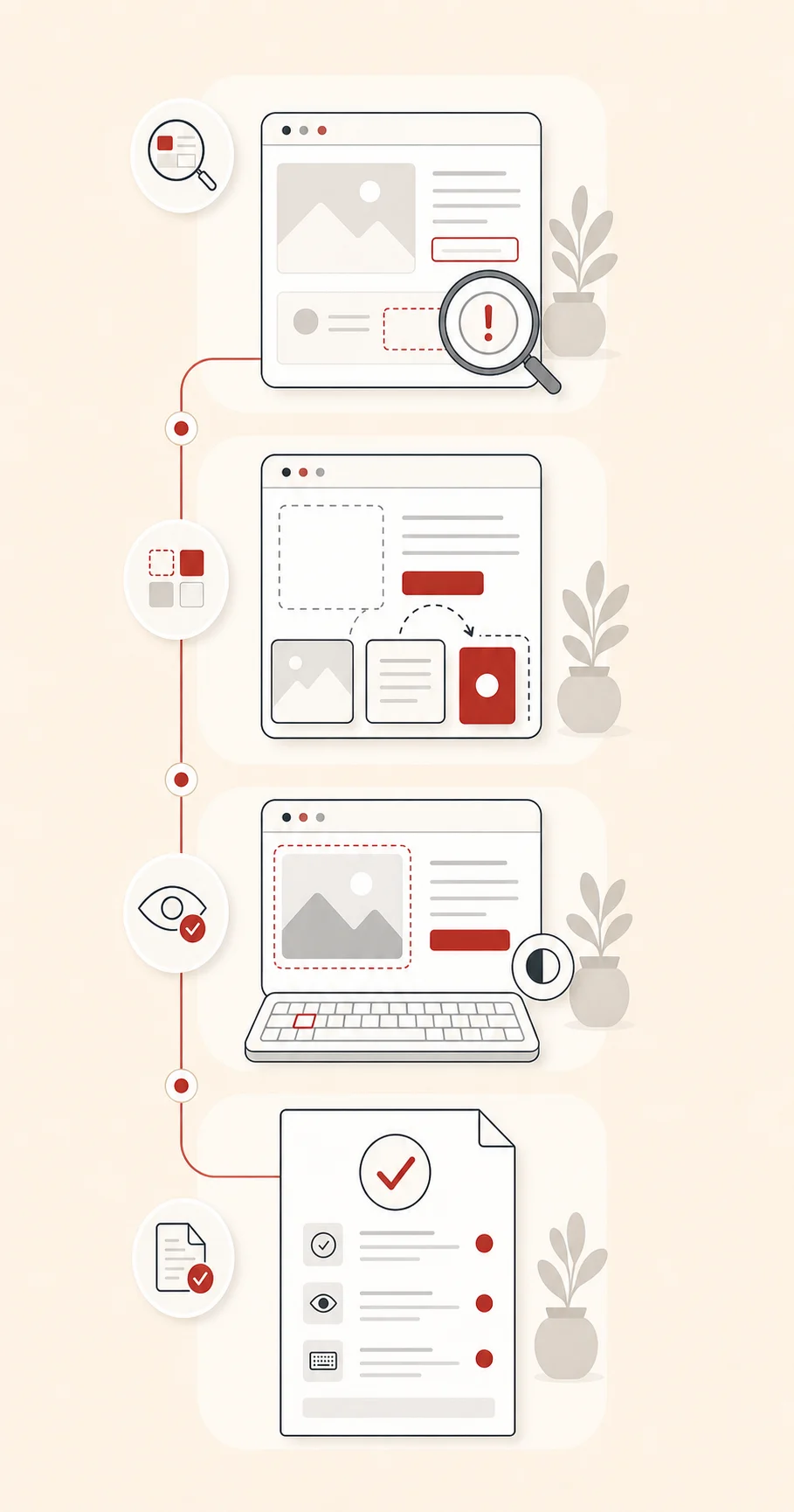
Infographic showing four test routes: axe-core 4.10.3 with 0 violations, manual testing with Enter and Space, 320 CSS px, target spacing from 24.6 to 87.4 pixels and text spacing, media testing of a 4.8-second silent video with a visible text alternative, and real form testing of the English language version with an error case and a test submission.
The retest
On the German homepage, after the correction I checked the visible labels and the native `required` attributes, but did not submit the form there. I tested submission behaviour on the English language version at `/en/welcome/`. An empty attempt there sends nothing: native HTML5 validation takes effect, focus lands in the email field, the browser reports "Please fill out this field." and for the checkbox "Please check this box if you want to proceed." According to the W3C explanations of Error Identification and Error Suggestion native validation can meet these criteria; `aria-invalid` and `aria-describedby` are not mandatory.
After that, exactly one successful test submission was made on the same English language version, with a clear test message. The success message reads "Thank you, your message has been sent and I will get back to you shortly." It appears by AJAX without a URL change, resets the form and is marked with `role="status"` and `aria-live="polite"`, making it a status message in the sense of Status Messages. Moving focus here would not only be unnecessary, but disruptive.
Result of the retest: success criteria 3.3.1, 3.3.2, 3.3.3 and 4.1.3 passed. Within the audited scope there are no confirmed Level A findings, none at Level AA and no open form criteria. This is deliberately not a formal conformance claim for my whole website, but an evidenced statement about one audited page on a particular date. The benchmark throughout is WCAG 2.2, tested with axe-core.
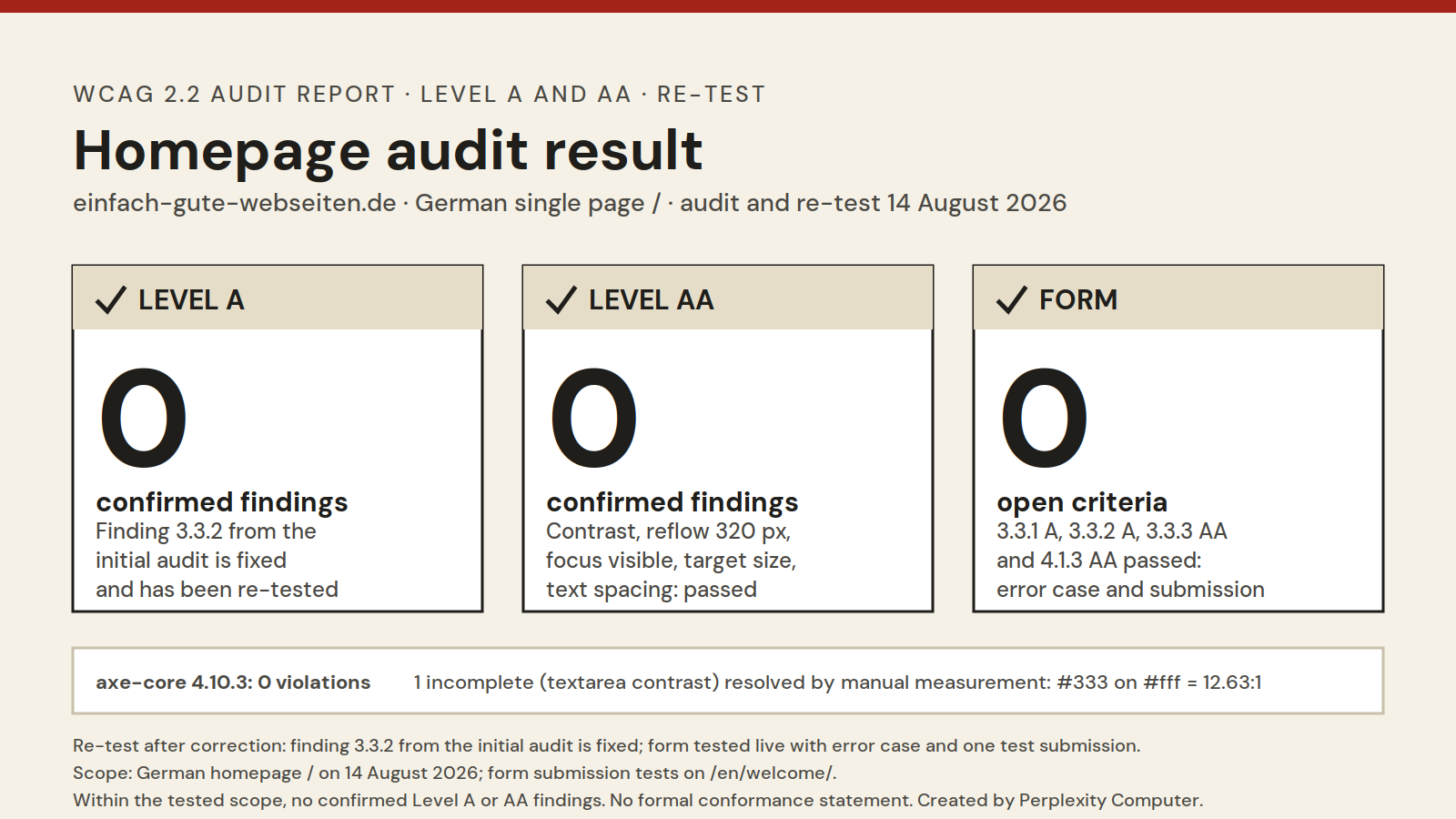
Infographic of the result after retesting: 0 confirmed Level A findings, 0 confirmed Level AA findings, 0 open form criteria; success criteria 3.3.1, 3.3.2, 3.3.3 and 4.1.3 passed; axe-core 4.10.3 reports no violations.
How this is implemented in Elements
All corrections were made using RapidWeaver Elements: the addition to the label through the form component's field settings, heading levels through the heading component and graphics through the image component with alternative text. There is no code export and no one-off solution. My homepage remains exactly what it was before: a normal Elements project that I continue to maintain myself.
Read the full test report as a PDF (7 pages)Who this is for
Existing RapidWeaver Elements users
Your website is built and published in Elements and is to be remediated to WCAG 2.2 Levels A and AA. You continue working in Elements yourself, so everything remains in the project: I audit, implement corrections using Elements, retest and document every change clearly. This is the first service route and a separate paid engagement.
New clients with a new website
You need a new website and would like it to be built accessibly from the outset. We then plan structure, design and content to WCAG 2.2 Levels A and AA from the beginning; I build the site in Elements and test it before publication. This is the second service route; work to WCAG 2.2 is an additional paid option alongside the price of the new website.
Moving from RapidWeaver Classic to Elements
Your site still runs in RapidWeaver Classic and you would like to move to Elements. When rebuilding in Elements, accessibility can be considered directly rather than corrected later. Here too, work to WCAG 2.2 Levels A and AA is an additional paid option to the migration itself, which I carry out only when expressly commissioned.
Operators of websites built in other systems
Your existing website runs on WordPress, Wix or another system. I can audit this website to WCAG 2.2 Levels A and AA and prepare a clear report for you or your existing provider. I do not make changes in the other system. If you are renewing the website anyway, I can instead build it as a new RapidWeaver Elements project; accessible implementation is then a separately commissioned option.
Freelancers and self-employed professionals. Your website is your calling card. You want every prospective customer to be able to complete the contact form, including when using a keyboard, zoom or a screen reader.
Small businesses. You do not have your own IT department, but customers, applicants and partners who need to use your pages. You need transparent documentation of what was tested and implemented.
Clubs, associations and non-profit projects. Your services should reach everyone, and your budget is limited. A fixed price after a clear initial assessment suits you better than open-ended hours.
How we work together
- You write to me. For an existing website, its address, the system used and one sentence about what matters to you are sufficient. For a new website or a RapidWeaver Classic migration, briefly describe the project: scope, content, timescale and, if available, the address of the previous site.
- Free initial assessment. I look at your pages or plans and tell you which areas are likely to need work and what test scope makes sense. This costs you nothing.
- Individual fixed-price quote. Scope, services, limits and completion time are set out in writing and clearly before you decide. For a new website and a Classic migration, work to WCAG 2.2 Levels A and AA is a separately listed paid option in the quote; it is implemented only if expressly commissioned.
- Existing Elements website: automated audit with axe-core and manual testing, then implementation in the Elements project, agreed with you and without throwing your design overboard. For a website from another system, the audit-only engagement ends with the report instead.
- New website or Classic migration: accessible planning, build in Elements and testing before publication.
- Retesting. The same test steps again, with a result for each finding.
- Handover. You always receive the report and a short explanation of what to watch for in future changes. If implementation is commissioned, you additionally receive the remediated or newly built Elements website.
What you receive at the end
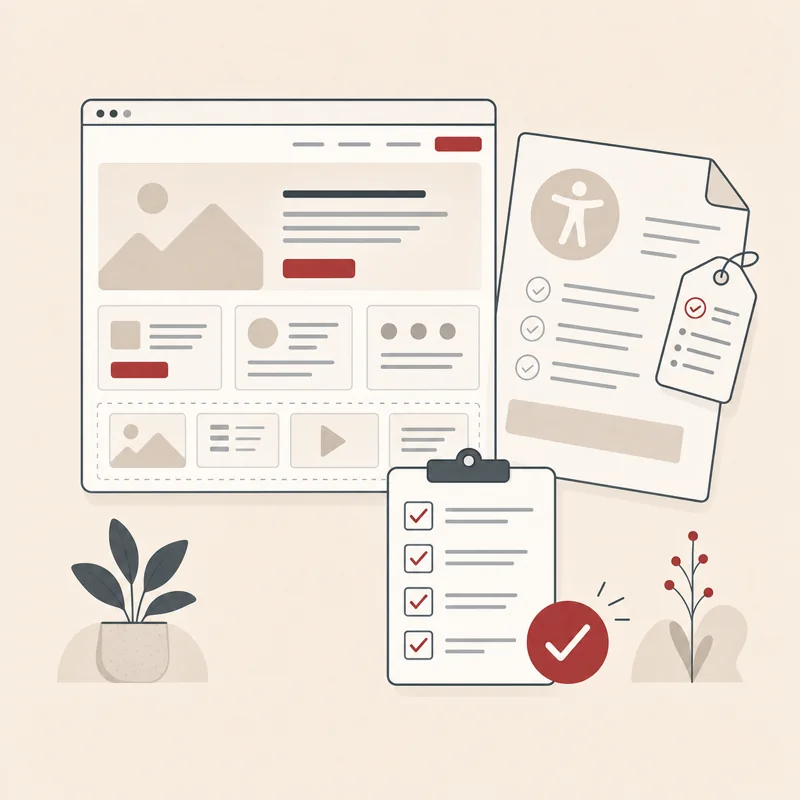
- A PDF test report with date, test scope, method, a criteria table with measurements and tested remedies, in the form and design of the established report template
- A text version of the report so that you can reuse individual passages
- For an audit-only engagement for a website built in another system: an actionable report for you or the responsible provider, with no technical changes to the other system
- For an existing website: your remediated pages in the existing Elements project
- For a new website: the new website as an Elements project, planned and built to WCAG 2.2 Levels A and AA from the outset and tested before publication
- For a RapidWeaver Classic migration: the rebuilt Elements project with retained and revised content
- Separate reporting of passed points, resolved findings and the result of retesting
- A robust form of words for your communications, within the audited scope and without exaggerated promises
- A short guide to maintaining the achieved state in future changes
Why you can trust me with this

I work with Elements myself. Your websites remain Elements projects that you can continue to maintain, whether remediated or newly built. I do not build a one-off solution that only I understand.
I show my process through my own example. The report for my homepage is fully open, including the finding I had myself and the limits of the defined test scope.
I do not claim anything I have not tested. If something cannot be determined without assistive technology or access to a third-party system, the report says so plainly. I do not sell a certificate or a guarantee of conformity, but a documented audit and documented remediation.
Frequently asked questions
Request a free initial assessment
Send me the address of your existing website and tell me which system it uses. Or briefly describe your new project or planned move from RapidWeaver Classic to Elements. I will look at it and come back to you with an initial assessment: which areas are likely to need work, what test scope makes sense and what it costs. For a website built in another system, I will state expressly that I offer the audit and documentation only, not changes in that system. The initial assessment is free and without obligation. Only afterwards will you receive an individual fixed-price quote, and I start only when you agree.
For a new website and a Classic migration, I show work to WCAG 2.2 Levels A and AA separately in the quote as an additional paid option. You decide whether to commission this additional scope.
"A competent contact when it comes to Internet presentations. Innovative ideas and especially the quick turnaround as well as the quality of implementation!"
ocEmail1
ocPhone1